A hosted control plane for coding agents, built on opencode.
Describe a job once — model, prompt, the tools it may touch — then pick what starts it and
where the answer lands. Or install a finished process from the template catalogue and
answer three questions. Your keys, and every run inside its own container.
oncall-triage history on a volume · reaped when idle
your code and your keys stay inside your own containers
How you use it
Your process is four choices
Everything here is assembled from the same four things: what starts a run, which agent
takes it, what that agent is allowed to touch, and where the answer goes. Pick one from
each column and you have a working process — no YAML to write, no glue service to deploy,
and nothing to rebuild when you change your mind about one of the four.
01 · trigger
What starts it
By hand — from the web UI, when you want to watch it work
A schedule — cron with a real timezone: 08:45, weekdays
A webhook — your own URL and secret; add ?wait=180 and the caller gets the answer in the response body
A Telegram message — to your bot, from your phone
Another run — rules fire on session.failed, schedule.fired, webhook.received
02 · agent
Who takes it
Model and prompt — your provider, your key, your instructions
Permissions — what it may edit and what it may run, set per agent
Skills — markdown instructions attached with a checkbox
One agent per job — a reviewer, a triager, a reporter; written once, used by every trigger
Memory — long-term notes the agent sees in every new session and rewrites itself
Where it runs — an isolated container per session, or a shared one per project that opens instantly
03 · tools
What it may touch
The MCP catalog — GitHub, Postgres, Sentry, your own API: one click to attach
A real browser — bundled Playwright, in its own container
Your servers over SSH — only the commands you whitelisted, with a regex on every argument
Project files — put a file in storage, get a link back
Web search — for the part of the answer that isn't in your repo
Other agents — hand a subtask to another agent and wait for its answer; it shows up as a child session
04 · result
Where the answer lands
Telegram — the agent writes to you itself, files included
An outgoing webhook — signed with HMAC-SHA256, retried with backoff, every attempt logged
An issue — filed by the agent in the built-in tracker
A file in the project — a CSV, a screenshot, a report, with a URL
The HTTP response — when the caller asked to wait for it
None of this is a plugin you have to go and find: triggers, tools and destinations are
ordinary pages in the UI — and they are the same objects the operator agent creates when
you would rather just describe what you want in words.
Your first process, click by click
Put in a key
Providers → paste the key → Check. A throwaway container makes a real call with it, so a bad key fails here instead of at 3 a.m. inside a scheduled run.
Or take a finished one
Catalog → Templates: page watchdog, morning digest on a topic, server nightwatch, code reviewer, researcher. The template asks only what cannot be guessed — the addresses, the topic, the cron line — and creates the agents, schedules and webhooks in one go.
Describe the agent
Agents → new: the model, what the job is in plain words, which MCP servers and skills it may use, what it is allowed to write and run.
Choose the trigger
Automation → Schedules for a cron line, Webhooks for a URL your systems can call, Rules for “whenever a run fails”.
Choose where it reports
Channels → Telegram: bot token, your user id, a chat for notifications — on every run or only on failures. Or point an outgoing webhook at your own system.
Or just say it out loud
Home screen: “a review agent for pull requests, give it GitHub, start it from a webhook, send the result to Telegram”. The operator agent creates all four while you watch the transcript.
The problem
The work that comes back every week
Most of what an agent is worth is not a one-off question. It is the review that has to
happen on every pull request, the check that the site still works every morning, the
numbers somebody asks for every Monday, the 3 a.m. alert that always begins with the same
five commands. A terminal agent can do any of it — once, while you sit there and watch.
Hosted products automate that and charge for it, with your code in their sandbox and their
model. Vibeprod runs the automation for you but keeps the parts that matter yours: your
provider keys, one isolated container per run, and the full transcript of everything that
happened. You assemble the process on a few pages in the UI, and it keeps running whether
you are at the keyboard or not.
What you can wire up
Every part you need, already in the box
You always know what ran overnight
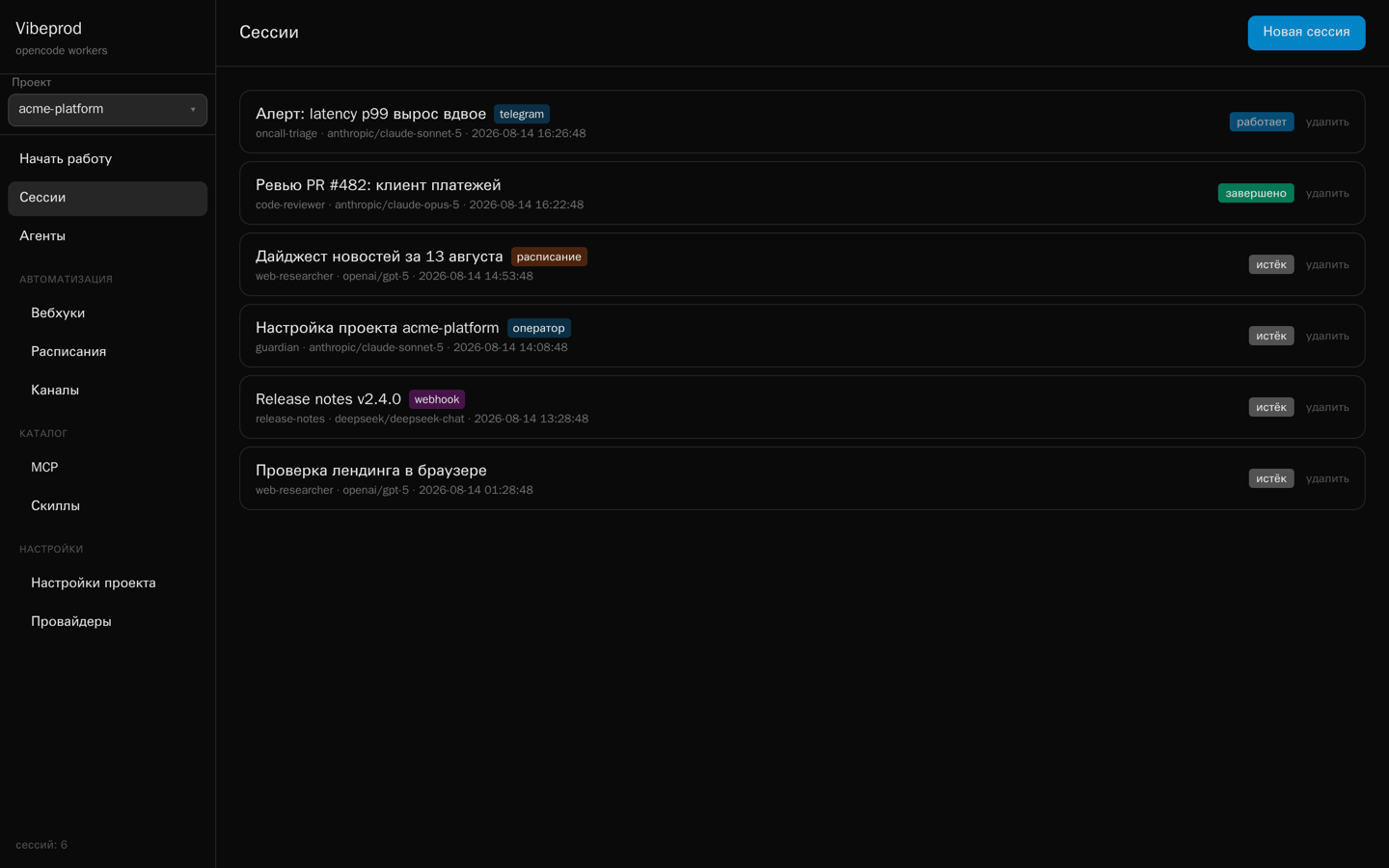
Every run lands in the same list with the same transcript, labelled by what started
it — the nightly cron, the webhook from CI, the question you asked from the sofa over
Telegram. Each row carries what the run cost and where its time went, model against
tools; runs an agent started for itself fold in under their parent, with their cost
summed into it. Nothing is hidden in a log file somewhere. A worker can be restarted
without losing the thread: history lives on a Docker volume, not in the container.
Sessions — labelled by trigger, live status on the right
When a run goes wrong, you can see where
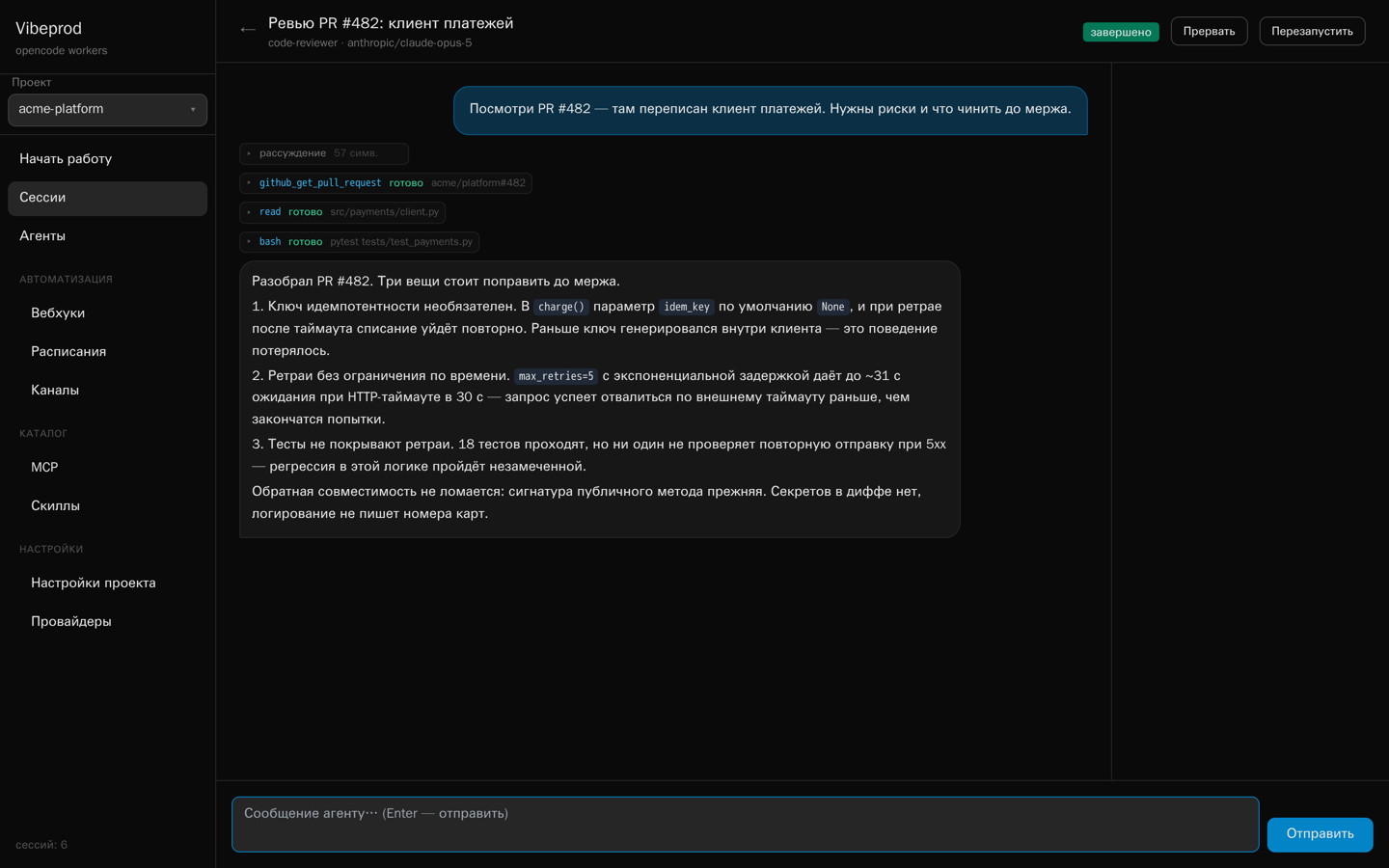
Tool calls, reasoning blocks and todo lists appear as they happen, so a bad prompt is
visible in the second step instead of being guessed at from a final message. Nothing
is lost afterwards either: the events are stored as they arrive, and the full
transcript is kept when the session goes idle.
A code-review session — tool calls collapse, the answer stays readable
Tune the agent once, use it from everywhere
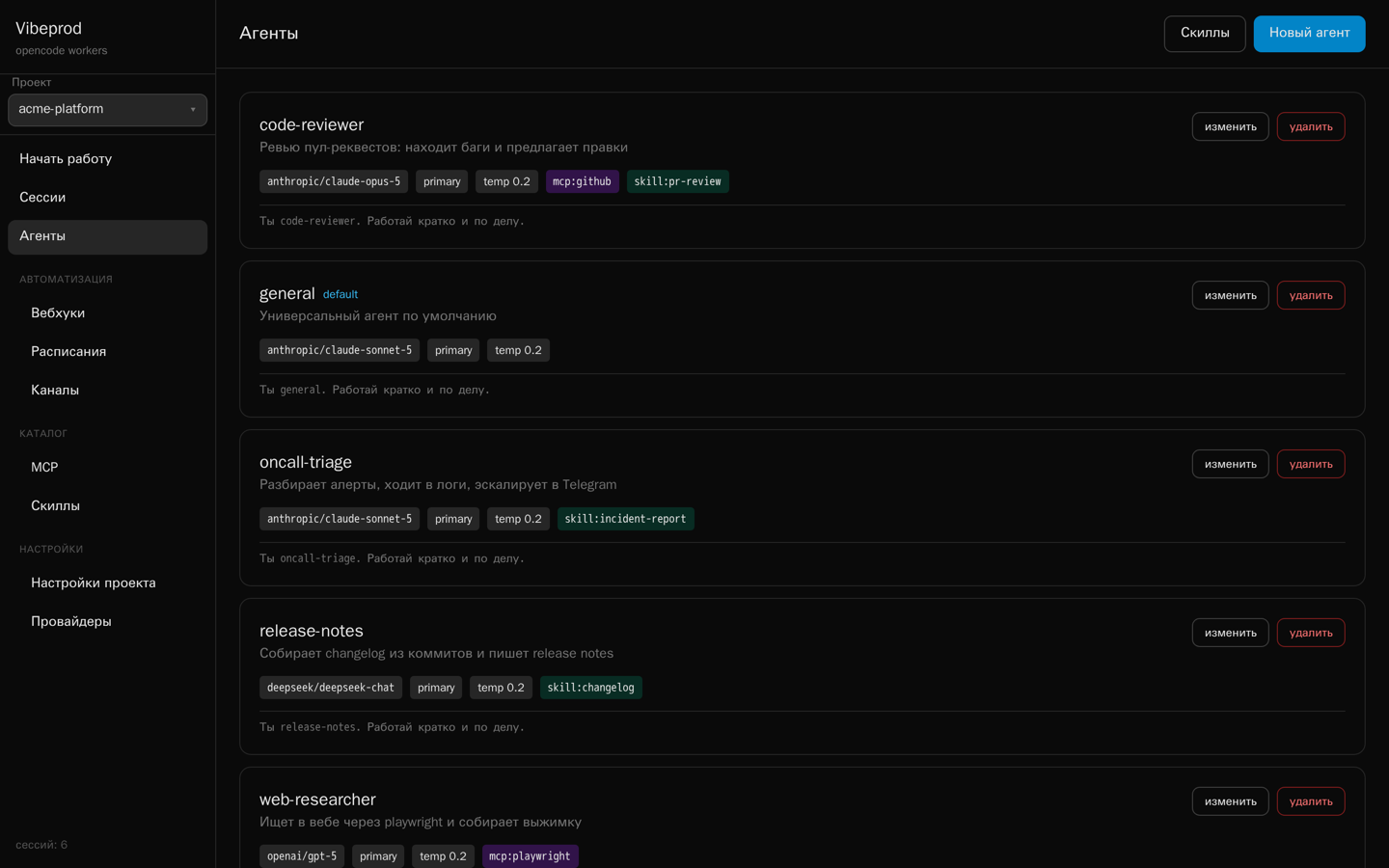
The cron job, the webhook and your phone all talk to the same reviewer you tuned —
you fix the prompt in one place and every trigger picks it up. An agent is one saved
record: model, mode, temperature, permissions, system prompt, plus the MCP servers and
skills attached to it. It also has a memory: a block of long-term text it sees in
every new session and rewrites itself through memory_get and
memory_set, which is how a watcher knows what the page looked like
yesterday. At session start all of it becomes a stock opencode.json
and a set of markdown files in the worker's workspace, so nothing you write here is
locked to this project.
Agents — model, attached MCP servers and skills on each card
A working process before you have configured anything
The template catalogue ships whole processes, not just agents: a page watchdog
— a real browser, a comparison against what it saw yesterday, a Telegram alert only
when something actually changed; a morning digest on a topic — a scout with web
search and an editor that writes it up; a server nightwatch — an SSH round, an
issue and an alert only when a service looks wrong. Plus standalone agents: code
reviewer, researcher, screenshotter, issue groomer, Telegram assistant. Installing one
asks only what cannot be guessed — the addresses to watch, the topic, the server name,
the cron line — and then creates everything at once: the agents with their MCP servers
and skills, the schedules, the webhooks and the event rules. Each manifest is plain
JSON, and the {{variables}} in it are substituted anywhere inside it when
you install.
Schedules, webhooks and chat — all built in
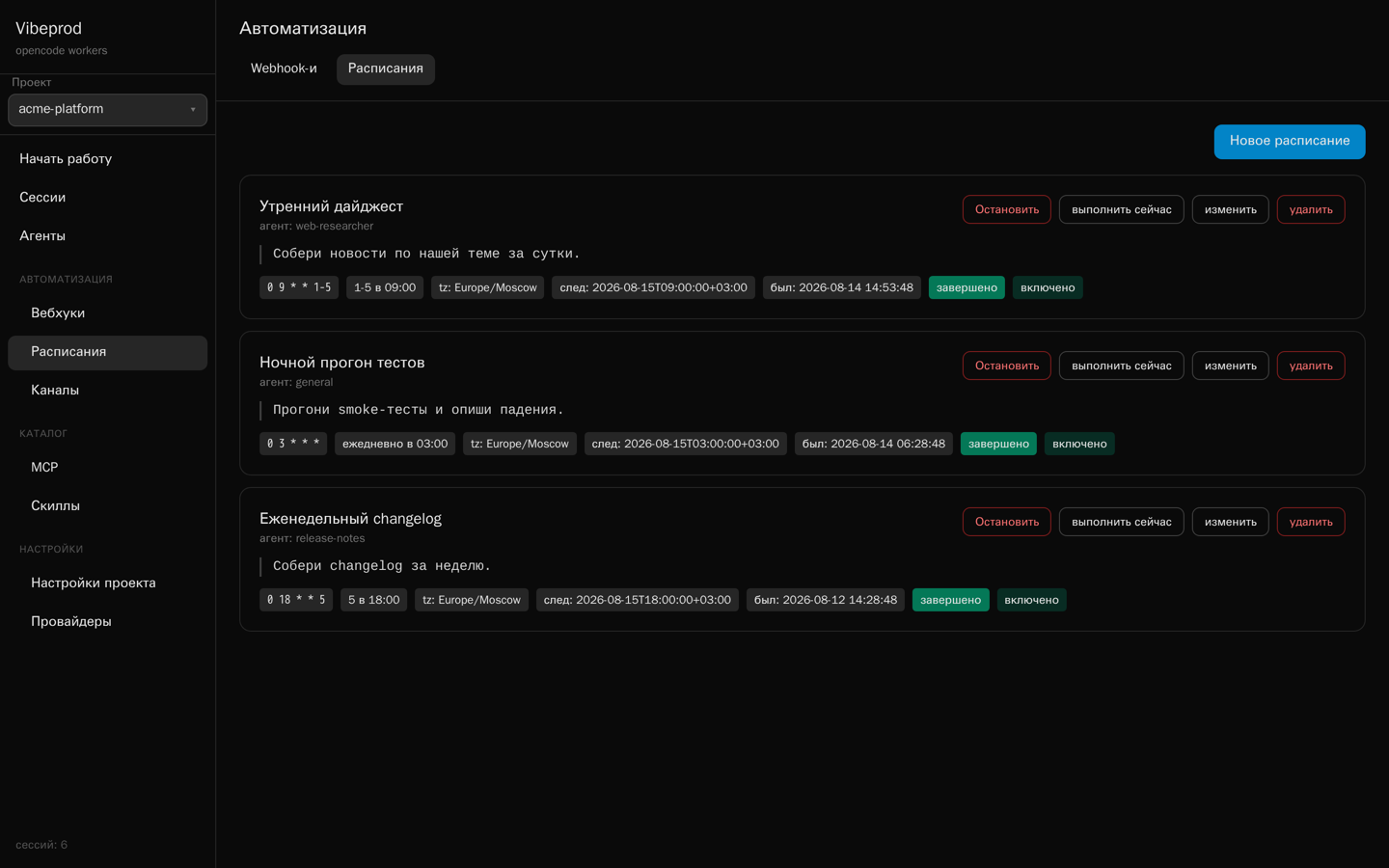
Cron schedules carry a timezone and record every run, so “09:00 on weekdays, Europe
time” is one field and not a server you maintain. Webhooks give any external system a
URL to start an agent, optionally guarded by a secret, optionally blocking until the
answer is ready. Telegram runs inside the broker on long polling — no public URL, no
extra dependency — and streams the reply by editing the bot's message. Point it at a
notification chat and every scheduled or webhook run reports back there, either always
or only when it fails.
Schedules — cron with a timezone, next and last run on every card
One run can answer another
Rules start an agent on events inside the broker: a session finished or failed, a
schedule fired, a webhook came in. Conditions narrow the trigger — only this agent,
only runs that came from a schedule, only payloads containing a given string — and the
action is either a fresh session or a message into the very session that raised the
event, context and transcript kept. The prompt is a template: {event},
{json}, the event's own fields — {title},
{error}, {result_text} — and the loop counters
{iteration} / {max_runs}. That is enough for an agent that
grinds at one task until it reports it is done: subscribe it to its own
session.completed, cap the chain at ten iterations, give it a stop word.
The editor walks you through it — a recipe, the event, the conditions, the action, the
prompt, the bounds — and Check is a dry run: it shows whether the rule
would have fired on the last matching session and what the prompt would have looked
like, without starting anything.
Agents that hand work to each other
An agent can be allowed to call other agents by name: agent_run starts one
and either waits for the answer or returns a session id to pick up later with
agent_status. The scout gathers the material and the editor writes the
digest; the watcher notices the page moved and the analyst says whether it matters.
Each of those runs is an ordinary session, nested under the one that started it in the
list and adding its cost to the parent's — so a team of agents is still one thing you
can read afterwards.
A tracker the agents fill in themselves
Findings that deserve more than a chat message go into the built-in issue tracker:
title, description, status, priority, tags, comments, search. Every agent has
issue_create, issue_list and issue_update, so
the nightly run files what it found and you open a list in the morning instead of
reading through transcripts. You can assign an issue to an agent, and file your own by
hand in the same place.
Your servers — but only the commands you allowed
An agent can reach a real server over SSH, and only through commands you wrote down on
the SSH page: a name, a command template, a regex for every parameter, a timeout.
systemctl status {service} where service must match
^[a-z0-9-]+$ becomes a tool the agent may call; there is no shell behind
it and nothing else is reachable. Host keys are pinned on first connect, and every run
is logged with its exit code and output — so “read the logs on prod” is something you
can hand to an agent without handing over the box.
Your own systems hear about it too
Outgoing webhooks make the broker a source of events, so the result of a run can land
in your dashboard, your ticket system or your own script without anyone polling.
Subscribe a URL to session.completed, session.failed,
schedule.fired or webhook.received and it gets a POST with
the session summary. Set a secret and the raw body is signed with HMAC-SHA256.
Failed deliveries retry with backoff — 1s, 5s, 15s, 60s, 300s — and every attempt,
successful or not, stays in the per-webhook delivery log with its response code,
ready to be replayed by hand.
A worker's workspace disappears with the worker. Project files don't: every project
gets its own bucket in a MinIO container that comes with the compose file, browsable
and uploadable from the Files page. Agents reach the same storage
through the files MCP server in the catalog — one click to attach —
whose upload_file tool pushes a file out of the worker and returns a
link. Together with Playwright and the bundled screenshot-to-files
skill that is a complete loop: take a screenshot, put it in the project, answer with
the URL.
Give an agent a browser, a database or your API
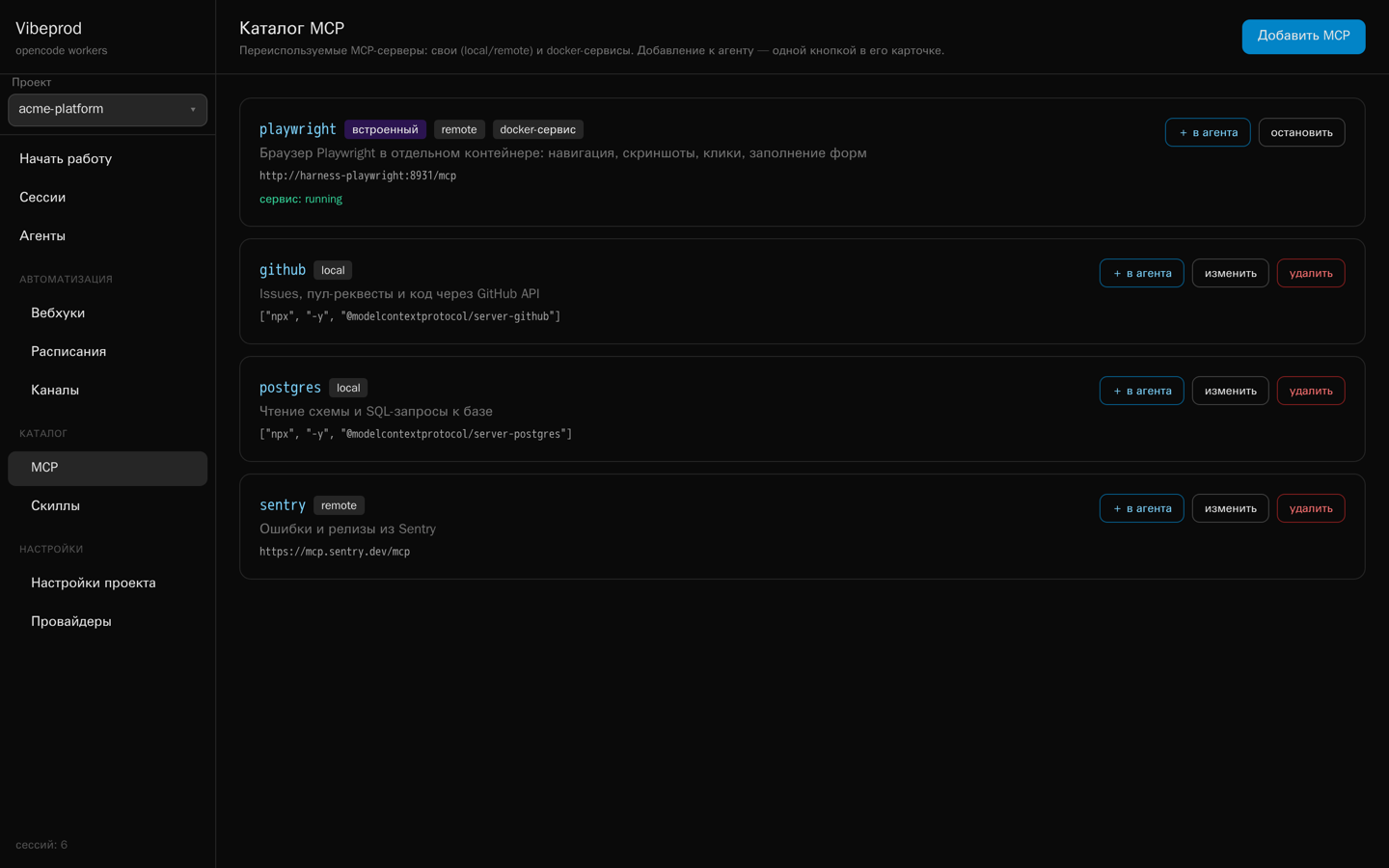
The MCP catalog holds reusable servers: ordinary local and remote ones, and Docker
services that Vibeprod starts on demand. The bundled Playwright service gives any
agent a real browser in its own container, on a private network the workers share.
MCP catalog — attach any entry to an agent from its card
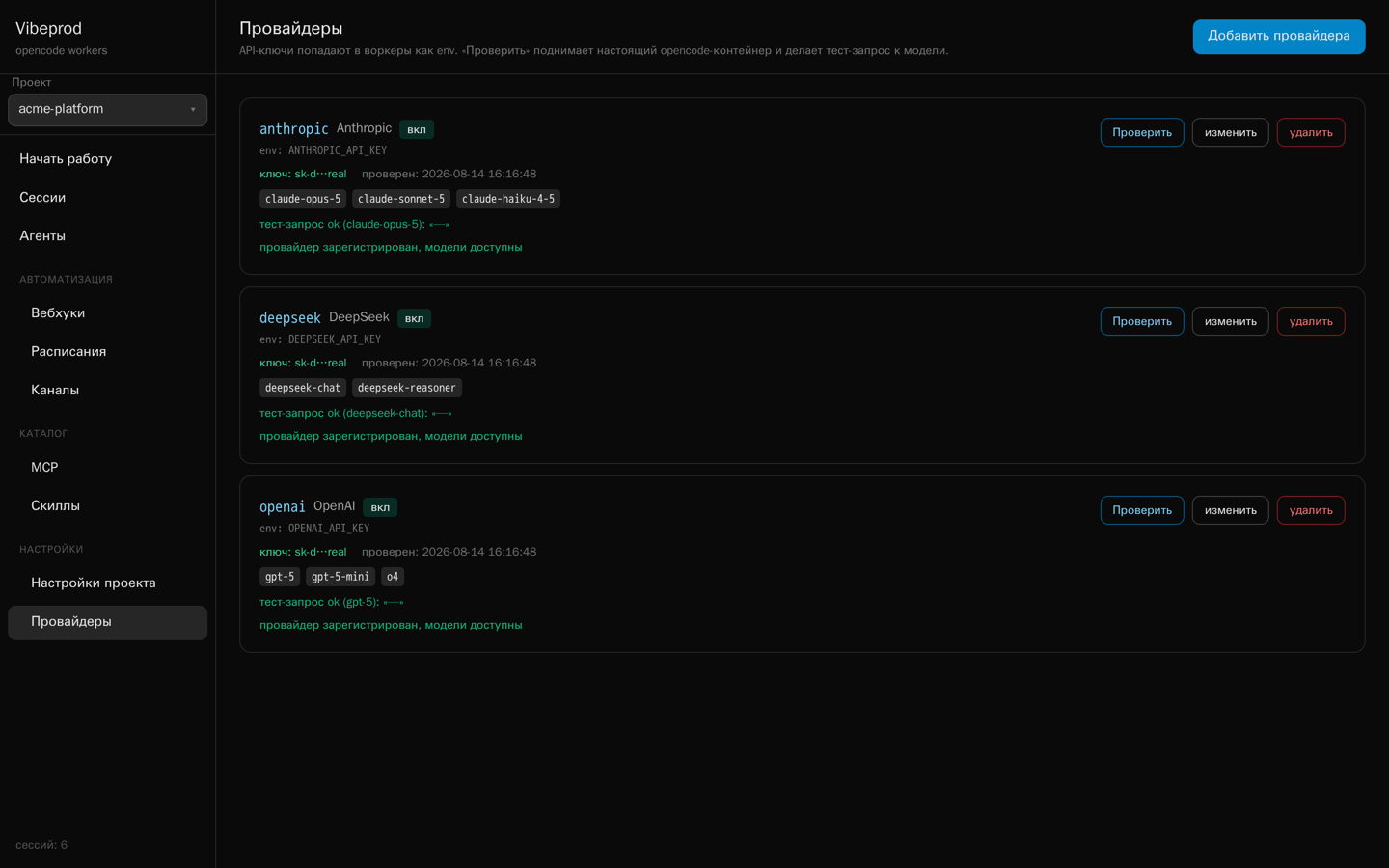
A key that is verified before it matters
Provider keys live in your database and are injected into workers as environment
variables. Keys belong to a project, so the one you added for a client is never handed
to the workers of another; alongside the built-in list you can register any
OpenAI-compatible endpoint of your own — base URL, key, the models it serves.
Check spins up a throwaway container with the same opencode image and
your key, confirms the provider registers, lists the models it offers and makes a real
generation call — the exact path a worker will take, so a bad key fails here instead
of halfway through a scheduled run.
Providers — verified against a real container, not a regex
Isolated per session, or shared per project
Every agent carries an isolated environment checkbox. Ticked, each of its
sessions gets its own container — own workspace, own port, own token, own memory
budget — and a cold start of a few seconds. Unticked, the sessions of that project
share one pre-started opencode container and each works in its own folder
/workspaces/<session_id>: they open instantly and one process serves
them all, at the price of a memory budget shared across the project and a restart that
touches every shared session at once. Either way the histories live on a Docker volume,
the port stays private to the broker, and nothing runs outside its own container.
A lock on the front door
The UI and the whole API sit behind your account login, on a signed cookie that lasts
a week. Webhook endpoints keep their own secret and the operator's MCP endpoint keeps
its bearer token, so automation carries on working without a session. Projects keep
providers, agents and history apart, so the key you added for one client is never
handed to another's workers.
The unusual part
The agent configures the platform
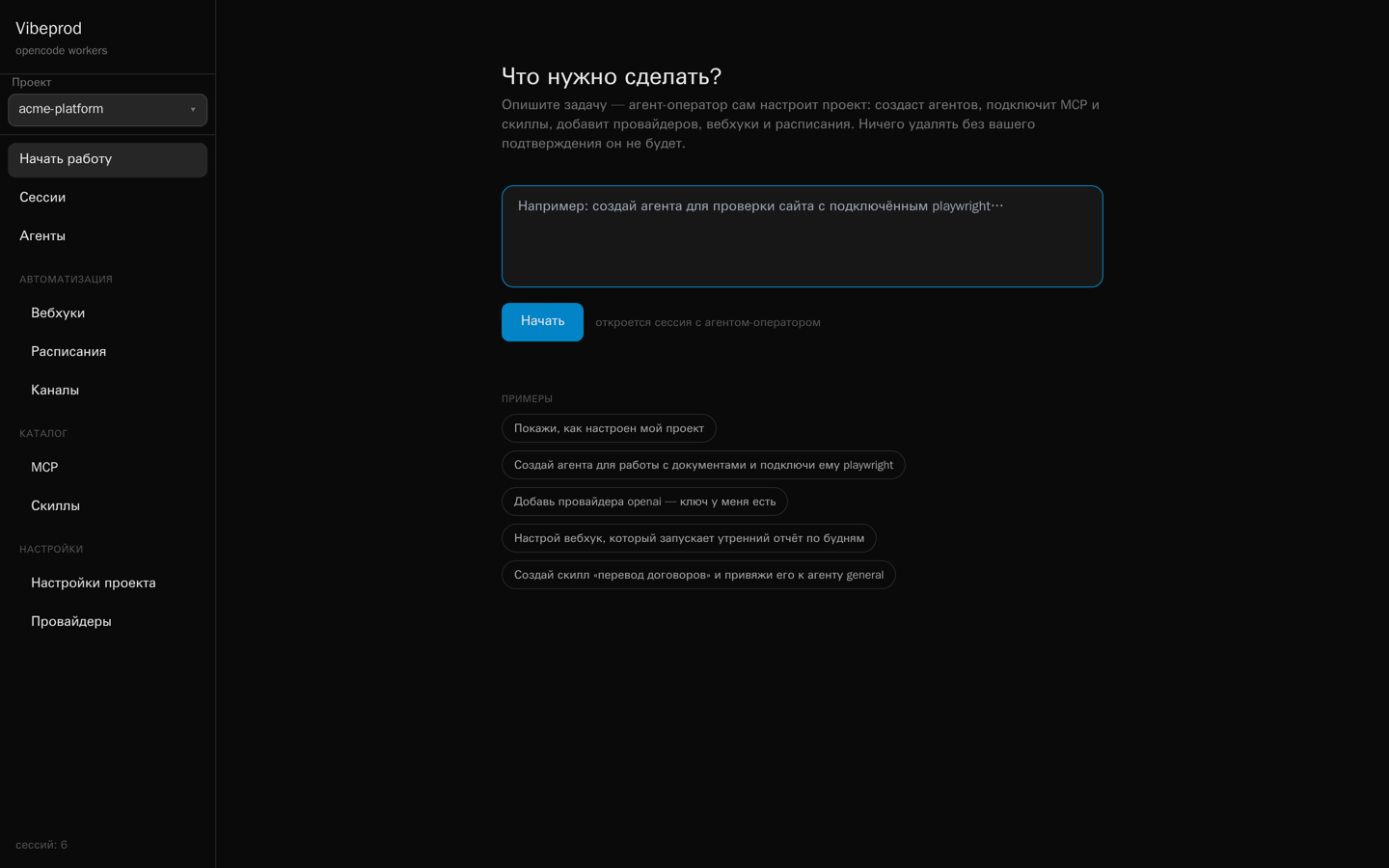
Vibeprod ships with an operator agent that reaches back into Vibeprod itself through a
private MCP server living inside the broker. Describe what you want on the home screen —
“review agent for pull requests, give it GitHub, run it from a webhook” — and it
creates the agents, attaches the MCP servers and skills, adds the providers, checks the
keys, wires up the webhook and the schedule, and can put files into the project's storage
on the way. It reads the same template catalogue you do, through
template_list and template_install, so “set me up the page
watchdog for these three URLs” is one sentence. You watch it happen in a normal session
transcript, and nothing gets deleted without your say-so.
The operator's MCP endpoint is not in the catalog and cannot be attached to other agents:
its URL and bearer secret are injected only into operator sessions.
Use cases
Seven processes people actually leave running
Each case below is the four choices above, filled in: one trigger, one agent, the tools it
may touch and one place the answer lands — with the exact wiring underneath, so you can
rebuild it in an afternoon and swap in your own repo, your own database, your own chat.
The coloured dot is the trigger: manual,
schedule,
webhook,
chat.
01
Webhook from CI
Every pull request is reviewed before a human opens it
A GitHub Action posts the PR number to a webhook URL. The reviewer agent checks out the
branch inside its own container, reads the diff through the GitHub MCP server, runs the
test suite, and writes the review back to the PR. With ?wait=180 the CI job
blocks until the review is ready and prints it in its own log — no polling, no second job.
How one run goes
CI fires the webhook
POST /api/webhooks/pr-review/run?wait=180 X-Webhook-Secret: •••• {"prompt": "Review PR #482"}
The broker starts a session
tagged webhook · own container · own port · own token
The agent does the work
code-reviewer · mcp: github, files · reads the diff, greps the repo, runs pytest -q
The answer goes back two ways
a comment on the PR, and session.completed to your outgoing webhook — signed with HMAC-SHA256, retried on failure
What lands in the pull request
pull/482 — feat: batch upload
code-reviewer · via vibeprod · 41s
Ran the suite on the branch: 128 passed, 1 failed. Three things worth a look.
blockerupload.py:88 — the S3 client is created per file; 400 files means 400 TLS handshakes.
watchtest_batch.py — the failing case is the empty-manifest path, not flakiness. Reproduced twice.
nitThe retry loop swallows KeyboardInterrupt along with everything else.
Illustration — the review text is whatever your prompt asks for
BeforeThe diff waits for whoever has time, and the tests run somewhere you have to go and look at.
AfterThe first pass is done by the time the notification arrives, in an isolated container, on your key.
Alertmanager, Sentry or an uptime checker posts the firing alert to a webhook. The triage
agent pulls the recent logs, greps the repository for the failing symbol, lines it up
against the last deploys, then does two things a dashboard never does: it files an issue
in the tracker with issue_create, and it sends you the short version with
telegram_send. You wake up to a hypothesis, not a graph.
How one run goes
The alert fires
POST /api/webhooks/oncall/run {"title": "5xx rate 4.1%", "prompt": "…"}
The agent gathers context
logs, git log --since, the failing handler, the last three deploys
It files what it found
issue_create — title, findings, tags; visible in the Issues page a second later
And wakes you properly
telegram_send — or the notification chat, set to fire only on failures
What arrives on your phone
alert · api-gateway · firing 00:41
HTTP 5xx 4.1% on api-gateway
Started 00:38, right after a91f2c went out. All failures are on POST /v1/batch; everything else is flat.
The new code calls manifest["items"] without a default — the empty manifest from the mobile client raises KeyError and the handler turns it into a 500.
Filed as #137. Rolling back a91f2c should stop it; the fix is two lines.
00:41
roll it back and open a PR with the fix
00:42
code-reviewer is working…
Illustration — the reply continues the same session, so context is kept
BeforeA pager with a metric on it, and fifteen minutes of climbing into context before you can think.
AfterA named suspect commit, a filed issue, and a chat you can answer from bed.
Not a scraper guessing at markup: the bundled Playwright service gives the agent a real
browser in its own container. It opens the pages you care about — competitors' pricing, a
status board, your own checkout — takes screenshots, pushes them into the project's file
storage with upload_file, and delivers the digest with the images attached.
The screenshot-to-files skill ships with the box and wires those two together.
How one run goes
The schedule fires
cron 0 9 * * 1-5 · Europe/Moscow every run recorded, with its result
A real browser opens the pages
playwright service · own container on the vibeprod-mcp network · started on demand
Screenshots become project files
browser_take_screenshot → upload_file → a link that outlives the container
The digest arrives with pictures
telegram_send_file — text and images, straight into the chat
What the agent sees, and what you get
competitor.example/pricing
screenshot
Team plan$29$24 / mo
Morning digest · Fri
Competitor dropped the Team plan from $29 to $24 and moved SSO out of Enterprise. Screenshot attached.
Your status page is green; the checkout flow completed in 3 of 3 attempts.
pricing-2026-08-16.png · 214 KB09:00
Illustration — the same files stay browsable on the Files page
One session per repository, each in its own container: bump the dependencies, run the
suite against the bumped tree, sweep the TODOs, look for the dead module nobody has
imported since March. Nothing is pushed without your say-so — the output is a set of
issues in the tracker, written by the agent through issue_create, waiting
for you in the morning. A build that goes badly wrong takes its container with it.
Add a Postgres MCP server to the catalog once, attach it to an agent with one click, and
the weekly report writes itself: query, compare with last week, put the CSV in the
project's storage, send the short version to the chat. The database credentials sit in
your own catalog entry and the rows never leave the machine — the model sees only what
the agent puts in its answer.
How one run goes
Monday morning, before the standup
cron 30 8 * * 1 · Europe/Moscow
The agent queries directly
mcp postgres from the catalog · read-only role, your credentials
The raw table is kept
upload_file — weekly CSVs pile up in the project, one link each
You get the sentence, not the spreadsheet
what moved, by how much, and what looks wrong
The run, and its output
-- what the agent ran
SELECT date_trunc('day', created_at) d,
       count(*) signups
  FROM users
 WHERE created_at > now() - '7 days'::interval
 GROUP BY 1 ORDER BY 1;
Signups, last 7 days · +18% week over week
MoTuWeThFrSaSu
Weekend spike is one referral source, not organic — worth checking before anyone celebrates.
signups-w33.csv · 12 KB
Illustration — the chart stands in for whatever your prompt asks the agent to say
Telegram runs inside the broker on long polling — no public URL, no tunnel, no extra
dependency. The first message opens a session, the next ones continue it, and the answer
streams by editing the bot's message. /agents lists what you have,
/agent 3 switches, /new starts fresh, /abort stops
a run. Open the web UI afterwards and it is the same session, with the full transcript.
How it behaves
Long polling, not a webhook
the bot token and the allowed user ids live in the UI; the box stays closed to the internet
One thread, one session
history lives on a docker volume, so the worker can restart under you
The six cases above are made of agents, MCP servers, skills, webhooks and schedules — and
you do not have to click any of it together. The operator agent reaches back into Vibeprod
through a private MCP server inside the broker: it creates the agent, attaches the servers
and skills, adds the provider and verifies the key in a throwaway container, then wires the
webhook and the schedule. You watch it happen in a normal transcript, and nothing is
deleted without your say-so.
What you type
localhost:8000 — new session
“Make me a review agent for pull requests: give it GitHub, run it from a webhook
called pr-review, and send the result to my Telegram. Use DeepSeek —
here is the key.”
The home screen — plain language, no forms
Worth knowingThe operator's MCP endpoint is not in the catalog and cannot be attached to other agents: its URL and bearer secret are injected only into operator sessions.
What exists a minute later
agent code-reviewer — mode, model, permissions, system prompt
mcp github attached, token stored
provider deepseek — key verified in a probe container, models listed
webhook pr-review with a fresh secret
telegram notifications on, failures only
Illustration — every object shows up in the UI as if you had made it by hand
The real home screen — this is where the sentence above goes
Every morning, open the site in a real browser, log in, check that the signup form still submits — and send a screenshot to the chat only when it doesn't.
webhook
A form on your site posts the lead here: the agent looks the company up, writes a summary, files an issue and pings the chat.
schedule
Nightly: run the test suite and open one issue per failure, with the log excerpt already in the description and the flaky ones marked as such.
schedule
Monday 09:00: query the database through the Postgres MCP server, drop a CSV into project files, and send the three numbers that matter to the chat.
rule
On session.failed, a second agent reads the transcript, names the likely cause and suggests a patch — before you have noticed anything broke.
webhook
An alert from your monitoring: the agent pulls logs over SSH, with the allowed commands only, writes the diagnosis, and wakes you only when it cannot explain it.
schedule
Hourly: check the competitors' pricing pages in the browser, keep the numbers in project files, and say something only when one changed.
chat
On the road: ask what is running, ask for the patch, get the file back — the same sessions as the web UI, from your phone.
Whatever your process is, it is these four choices
Pick the trigger, the agent, the tools it may touch and where the answer lands — that is
the whole configuration, and any one of the four can be changed later without touching
the other three. All of it runs on Vibeprod, on your keys.
This is a young project, not a competitor to funded platforms on breadth or maturity.
It wins on one axis — triggers, schedules and a chat channel built in, with nothing extra
to wire up — and loses on others: the depth of the pull-request workflow, and years in
production.
Vibeprod
OpenHands
opencode
Goose
Devin · Jules · Codex cloud · Cursor agents
Web UI over many sessions
Yes
Yes
No — TUI and serve API
No — desktop and CLI
Yes, vendor-hosted
Container per session
Yes, or one shared per project
Yes
Runs on the host
Runs on the host
Vendor sandbox
Cron schedules
Built in
Cloud tier
No
No
Varies
Inbound webhooks
Built in
Cloud tier
No
No
Varies
Outbound webhooks
Built in
Varies
No
No
Varies
Chat channel (Telegram)
Yes
No
No
No
No
MCP support
Yes, shared catalog
Yes
Yes
Yes
Varies
Agent that configures the platform
Yes
No
No
No
No
Bring your own key
Yes
Yes
Yes
Yes
Subscription
Git and pull-request workflow
Via the agent and git
First-class
First-class
Yes
First-class
Auth, multi-user, RBAC
One shared login, no roles
Enterprise tier
n/a
n/a
Yes
Maturity
Early
Large, funded
Very large
Linux Foundation
Commercial
Compiled August 2026 from public documentation. Hosted products move quickly —
check the vendor's own pages before making a decision on this table alone.
Pick Vibeprod if
You want agents started by cron, webhooks and chat, reporting back over webhooks and
Telegram, with per-session container isolation and API keys that stay yours.
Pick something else if
You need per-user access control for a team, a hosted service with an SLA, or a
mature pull-request review workflow out of the box.
Get started
From sign-in to first run in a few minutes
Nothing to install and no server to keep alive. Sign in at
app.vibeprod.ru, add one provider key, and either
install a finished process from the catalogue or describe the one you want in a sentence.
Sign in
app.vibeprod.ru — your workspace is ready, nothing to set up first.
Add a provider key
Providers → paste the key → Check. A throwaway container makes a real call with it, so a bad key fails here instead of at 3 a.m. inside a scheduled run.
Take a finished process
Catalog → Templates: page watchdog, morning digest on a topic, server nightwatch, code reviewer, researcher. The template asks only what cannot be guessed and creates the agents, schedules and webhooks in one go.
Or just say it out loud
The operator agent wires up agents, MCP servers, providers, webhooks and schedules from one sentence on the home screen — you watch it happen in the transcript.